
Player786 Game Download Free For Pakistani Android Users in 2026
Today
6.8 MB
v1.0
Android 5+
10k+

Description
The Player786 Game serves as a dedicated digital gaming platform designed primarily for users seeking a diverse collection of card, casual, and arcade-style games within a single mobile interface. Tailored to provide quick access to online entertainment, the application brings together traditional regional favorites alongside modern interactive formats. Players searching for this platform are typically looking for a centralized hub that offers seamless navigation, responsive control schemes, and organized game rooms suited for both introductory players and experienced enthusiasts.
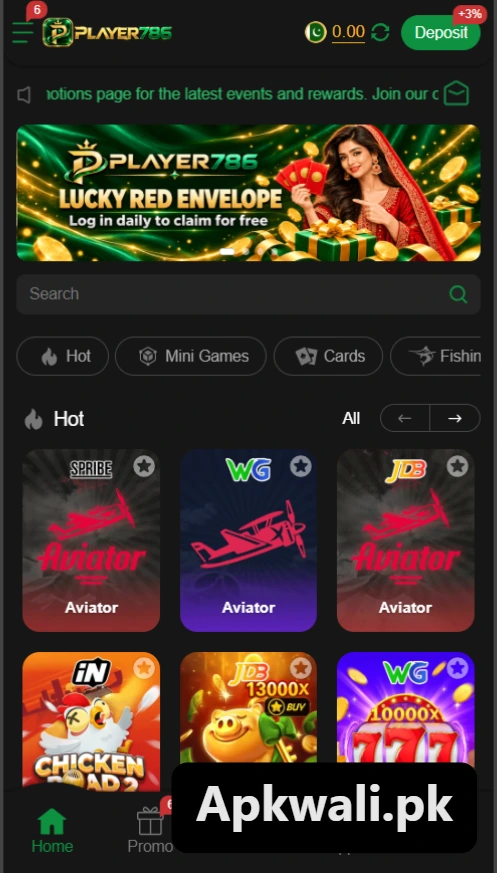
Operating on a lightweight infrastructure, the application prioritizes fast load times and stable connections across standard mobile networks. By consolidating multiple mini-games under a unified user account system, it eliminates the need to download separate applications for individual titles. This structure directly satisfies the intent of searchers who want a direct, reliable method to explore real-time multiplayer titles and practice skills across various casual categories on handheld devices. Check the 777x Game.
What is the Player786 Game Download?
The Player786 Game download refers to the installation package that grants mobile users direct access to the application’s complete lobby and interactive features. Available primarily via direct package files for mobile systems, this download bundles the client-side files necessary to render game graphics, connect securely to regional servers, and sync player profile data in real time. Obtaining the file allows users to bypass browser-based limitations, ensuring a smoother frame rate and quicker access to game lobbies directly from their device home screen.
Understanding the download process requires recognizing that the app functions as a client gateway rather than a standalone offline title. Once installed, the client periodically communicates with official host servers to fetch live room updates, balance adjustments, and platform announcements. Downloading the current release ensures that players receive the latest security patches, system optimizations, and access to active multiplayer sessions across all supported game modes.
Top Key Features of the Latest Version of Player786 Game
- Multi-Game Unified Lobby: Access various card, slot, and arcade challenges from a single dashboard without needing separate application installations.
- Optimized Network Performance: Built to maintain stable server connectivity even when operating on standard 3G or 4G mobile data connections.
- Real-Time Multiplayer Matching: Connects users directly to active player tables and live lobbies with minimal wait times.
- Low System Resource Usage: Designed with a compact file footprint that minimizes storage consumption and battery drain during extended play.
- Customizable Profile Dashboard: Allows players to track session history, manage settings, and view account status through a clean navigation menu.
How to Install the Player786 Game APK 2026 Latest Version?
For iOS Devices
- Open the Safari browser on your iOS device and navigate to the official platform web page.
- Select the designated iOS web access option or profile link provided on the host portal.
- Follow the on-screen prompts to trust the enterprise profile or bookmark the web app to your home screen.
- Launch the application icon directly from your home screen to access the main interface.
For Android Devices
- Download the official APK package directly from the verified source page onto your Android device.
- Open your device’s Settings menu, select Security or Privacy, and enable installation permissions for Unknown Sources.
- Locate the downloaded file in your device’s Downloads folder or file manager.
- Tap the package file, confirm the required application permissions, and complete the installation process.
How Do You Register an Account on the Player786 Game App?
- Open the installed application on your mobile device to display the primary welcome screen.
- Tap the Register or Sign Up button located prominently on the main menu interface.
- Fill in the required registration fields, such as a valid mobile number or username, and create a secure password.
- Submit the form and enter any verification code sent via SMS to validate and finalize your new account.
Step-by-Step Guide to Logging In to the Player786 Game Account
- Launch the application from your smartphone or tablet home screen.
- Select the Login option on the launch screen.
- Enter your registered mobile number or account ID alongside your secret password.
- Press the Submit button to authenticate your credentials and enter the game lobby.
Game Categories Available on the Player786 Game APK
- Card Games: Features classic skill-based options such as Teen Patti, Rummy, and Poker variants geared toward strategic play.
- Casual Arcade Titles: Offers quick-play titles including Color Prediction, Ludo, and Wheel formats designed for short entertainment sessions.
- Digital Slots: Includes varied thematic slot reels featuring simple spin mechanics and varied line patterns.
How to Manage Funds on the Game App?
Account funding and transaction monitoring within the application are handled through an integrated account wallet tab. Users can review their current balance, view structured history logs detailing recent gameplay outcomes, and monitor pending account requests. The system uses account-bound details to process entries, requiring users to maintain accurate personal information to ensure all record logs remain synchronized with their active profiles.
A Step-by-Step Guide to Depositing and Withdrawing Money
To Deposit
- Open the application, log into your profile, and tap the Wallet or Add Cash icon on the top menu.
- Choose your preferred local payment method from the displayed processing options.
- Enter the specific amount you wish to transfer into your in-game balance.
- Confirm the transaction through your selected payment provider’s authorization portal and wait for the wallet balance to refresh.
To Withdraw
- Navigate to the wallet section and select the Withdraw tab.
- Input your registered bank details or electronic wallet account information as required.
- Enter the withdrawal sum within the permitted platform balance limits.
- Confirm the submission request and allow the system to process the payout through the official queue.
Rewards and Bonuses on the Player786 Game Login
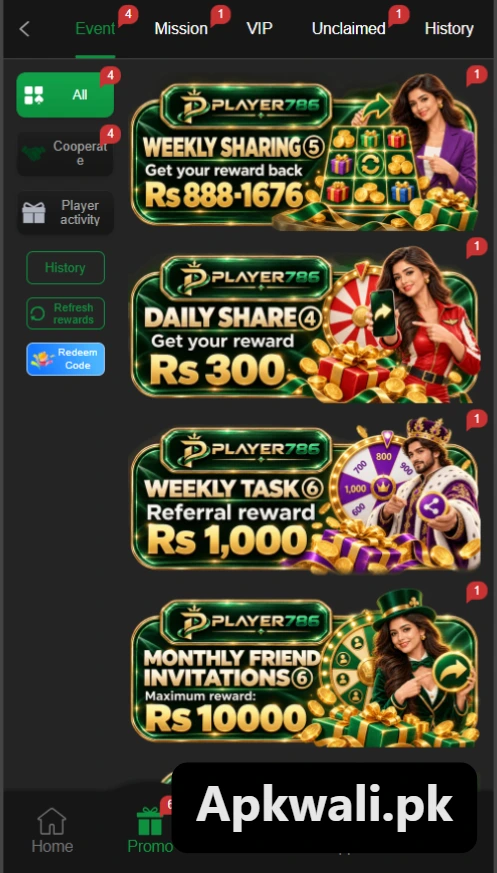
The platform incorporates several built-in promotional structures to reward active users for regular engagement. Upon logging in daily, players frequently receive nominal login bonuses or spin opportunities to replenish their virtual balance. Additionally, referral incentives are often available, allowing registered users to receive bonus credits when inviting new members through dedicated account links. All bonus balances are subject to specific room usage rules before becoming eligible for withdrawal standard processing.
Merits and Demerits
Merits
- Consolidated access to multiple traditional and casual game formats in one place.
- Lightweight installation package compatible with older or lower-spec mobile devices.
- Straightforward navigation layout making account management accessible for beginners.
Demerits
- Requires a stable internet connection to maintain active room connections without lag.
- Manual installation updates are required for Android users when new APK versions release.
Sharing My Personal Experience With This Game
An editorial review of the Player786 Game App highlights a functionally straightforward layout that minimizes clutter in favor of quick game access. The transition between the primary lobby and individual game tables remains smooth, with main categories clearly labeled along the navigation menu. Performance stays steady during routine card matches, provided the device maintains a steady cellular or Wi-Fi connection. While the visual aesthetic favors function over high-end graphics, the direct interface choices keep load times fast and practical for everyday mobile use.
Closing Thoughts
The Player786 Game stands out as a convenient choice for users seeking an all-in-one mobile platform featuring popular card and arcade games. Its simple installation process, lightweight footprint, and intuitive navigation make it approachable for players across various skill levels. By focusing on essential multiplayer stability and easy account management, the application efficiently serves its target audience seeking accessible mobile entertainment.
FAQs
Is the Player786 Game free to download?
Yes, the application file can be downloaded and installed on supported mobile devices without any upfront download fees.
Can I play the Player786 Game on a PC?
While the app is primarily designed for Android and iOS systems, it can be run on a PC using a compatible Android emulator program.
How do I update the Player786 Game application to the latest 2026 version?
Android users should download the updated package directly from the official portal and install it over the existing app, while iOS users can refresh through their access profile.
What should I do if I forget my login password?
Use the Forgot Password link on the login screen to reset your credentials using your registered mobile number or verification method.
Download links
How to install Player786 Game Download Free For Pakistani Android Users in 2026 APK?
1. Tap the downloaded Player786 Game Download Free For Pakistani Android Users in 2026 APK file.
2. Touch install.
3. Follow the steps on the screen.